Function Evaluation
Jump to navigation
Jump to search
- HOW TO: EVALUATE A FUNCTION GIVEN ITS FORMULA
- Replace the input variable in the formula with the value provided.
- Calculate the result.
Example:
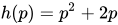
- Given the function Failed to parse (MathML with SVG or PNG fallback (recommended for modern browsers and accessibility tools): Invalid response ("Math extension cannot connect to Restbase.") from server "https://wikimedia.org/api/rest_v1/":): {\displaystyle h(p) = p^2 + 2p } , evaluate Failed to parse (MathML with SVG or PNG fallback (recommended for modern browsers and accessibility tools): Invalid response ("Math extension cannot connect to Restbase.") from server "https://wikimedia.org/api/rest_v1/":): {\displaystyle h(4) } .
Solution
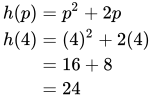
- To evaluate Failed to parse (MathML with SVG or PNG fallback (recommended for modern browsers and accessibility tools): Invalid response ("Math extension cannot connect to Restbase.") from server "https://wikimedia.org/api/rest_v1/":): {\displaystyle h(4) } , we substitute the value 4 for the input variable Failed to parse (MathML with SVG or PNG fallback (recommended for modern browsers and accessibility tools): Invalid response ("Math extension cannot connect to Restbase.") from server "https://wikimedia.org/api/rest_v1/":): {\displaystyle p} in the given function.
Failed to parse (MathML with SVG or PNG fallback (recommended for modern browsers and accessibility tools): Invalid response ("Math extension cannot connect to Restbase.") from server "https://wikimedia.org/api/rest_v1/":): {\displaystyle \begin{align} h(p) & = p^2 + 2p\\ h(4) & = (4)^2 + 2(4) \\ & = 16 + 8 \\ & = 24 \\ \end{align} }
Resources
- Evaluating Functions, Khan Academy
- Evaluating and Solving Functions, Lumen Learning